
-
Administrator Guide
-
Collect Logs
-
Collect Logs: Apps & Services
- ESXi
- Routers network hardware
- Apple iOS and macOS
- Unix and BSD system logs
- C# and .NET (NLog)
- C# and .NET (log4net)
- Java logback
- Android
- Kubernetes cluster logging with rKubelog
- haproxy
- Advanced Unix logging tips
- Perl
- Windows
- Kubernetes
- Erlang
- Node.js
- Java log4j
- JavaScript
- Unicorn
- PHP
- Docker
- systemd
- Ruby on Rails
- MySQL
- Unix and BSD text log files (remote_syslog2)
- Redis
- Go
- Python
- Elixir
- IIS
- Embedded devices or proprietary systems
-
Collect Logs: Hosting Services
-
Collect Logs: Integrations
-
Manage Logs
- Groups
- Log flood detection
- Web Hooks
- Log colorization
- Linking to logs
- JSON search syntax
- Settings API
- Log destinations
- Alerts
- Command-line client
- Log filtering
- HTTP API
- Automatic S3 archive export
- Managing Senders
- Permanent log archives
- Mapping senders to groups
- Search syntax
- Click-to-search
- Log search API
- Event Viewer
-
Send Logs for Analytics
-
SolarWinds Users & Orgs
-
Support and Security
-
What's New
Google Sheets
How to import one or more log archives into Google Sheets for additional analysis and charting.
Import
Download a log archive, which is in tab-separated value (TSV) format (more).
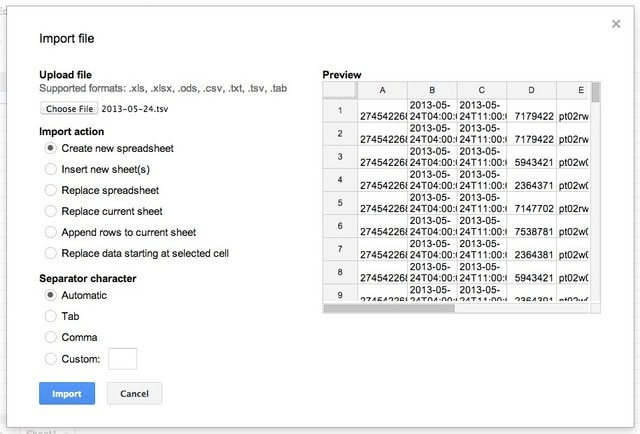
In Google Sheets, choose Start a new spreadsheet > Blank. Upload the archive file and let Sheets auto-detect settings:
Column names
After importing data, rename column headers to more useful names (from Permanent log archives).

Functionality
Filter
To analyze a subset of logs, use Data > Filter. See filtering.
Pivot tables
For additional analysis, use functions or Data > Pivot table report. Read Google’s introduction and documentation.
Charts
See charts.
Size note
As of this writing, Google Sheets are restricted to 2 million cells (more).