
-
Administrator Guide
-
Collect Logs
-
Collect Logs: Apps & Services
- ESXi
- Routers network hardware
- Apple iOS and macOS
- Unix and BSD system logs
- C# and .NET (NLog)
- C# and .NET (log4net)
- Java logback
- Android
- Kubernetes cluster logging with rKubelog
- haproxy
- Advanced Unix logging tips
- Perl
- Windows
- Kubernetes
- Erlang
- Node.js
- Java log4j
- JavaScript
- Unicorn
- PHP
- Docker
- systemd
- Ruby on Rails
- MySQL
- Unix and BSD text log files (remote_syslog2)
- Redis
- Go
- Python
- Elixir
- IIS
- Embedded devices or proprietary systems
-
Collect Logs: Hosting Services
-
Collect Logs: Integrations
-
Manage Logs
- Groups
- Log flood detection
- Web Hooks
- Log colorization
- Linking to logs
- JSON search syntax
- Settings API
- Log destinations
- Alerts
- Command-line client
- Log filtering
- HTTP API
- Automatic S3 archive export
- Managing Senders
- Permanent log archives
- Mapping senders to groups
- Search syntax
- Click-to-search
- Log search API
- Event Viewer
-
Send Logs for Analytics
-
SolarWinds Users & Orgs
-
Support and Security
-
What's New
Datadog
Introduction
Papertrail can update a Datadog dashboard displaying the number of log messages matching a search alert.
Setup
Follow the steps in Alerts.
Papertrail settings
From Datadog’s APIs tab,
click the Create API Key button under the “API Keys” section then copy the new key.
In Papertrail, attach a new Datadog alert to a saved search, then:
- paste the API key
- set a Metric name
- (optional) specify a set of Metric tags
Datadog visualization
Once the metric appears in Datadog, it needs a few settings adjusted to be visualized with the expected values.
When setting up a Timeseries chart of the metric, under Choose metrics and events:
- Select sum by (rather than the default avg by)
- Use the + button to add rollup sum
- Select Bars for Display:
as shown in this screenshot:
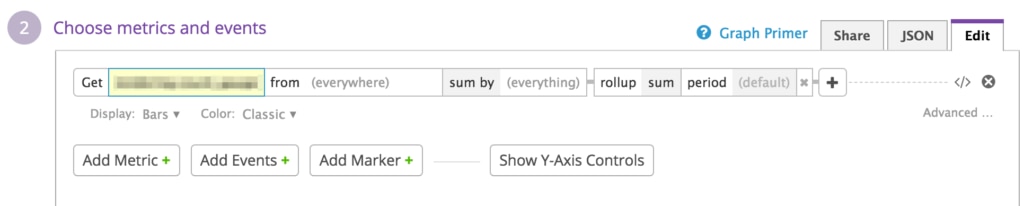
The rollup period is configurable; typically, (default) or 60 will most closely match what Papertrail sends each minute.