
-
Administrator Guide
-
Collect Logs
-
Collect Logs: Apps & Services
- ESXi
- Routers network hardware
- Apple iOS and macOS
- Unix and BSD system logs
- C# and .NET (NLog)
- C# and .NET (log4net)
- Java logback
- Android
- Kubernetes cluster logging with rKubelog
- haproxy
- Advanced Unix logging tips
- Perl
- Windows
- Kubernetes
- Erlang
- Node.js
- Java log4j
- JavaScript
- Unicorn
- PHP
- Docker
- systemd
- Ruby on Rails
- MySQL
- Unix and BSD text log files (remote_syslog2)
- Redis
- Go
- Python
- Elixir
- IIS
- Embedded devices or proprietary systems
-
Collect Logs: Hosting Services
-
Collect Logs: Integrations
-
Manage Logs
- Groups
- Log flood detection
- Web Hooks
- Log colorization
- Linking to logs
- JSON search syntax
- Settings API
- Log destinations
- Alerts
- Command-line client
- Log filtering
- HTTP API
- Automatic S3 archive export
- Managing Senders
- Permanent log archives
- Mapping senders to groups
- Search syntax
- Click-to-search
- Log search API
- Event Viewer
-
Send Logs for Analytics
-
SolarWinds Users & Orgs
-
Support and Security
-
What's New
Log destinations
Introduction
Using Papertrail, you can create log destinations for systems that send logs either via HTTPS or via TCP/UDP in a traditional Syslog setup. The connection method is configured when creating a new destination.
Configuring log destinations
To create a log destination, go to the Log Destinations then click Create Log Destination.
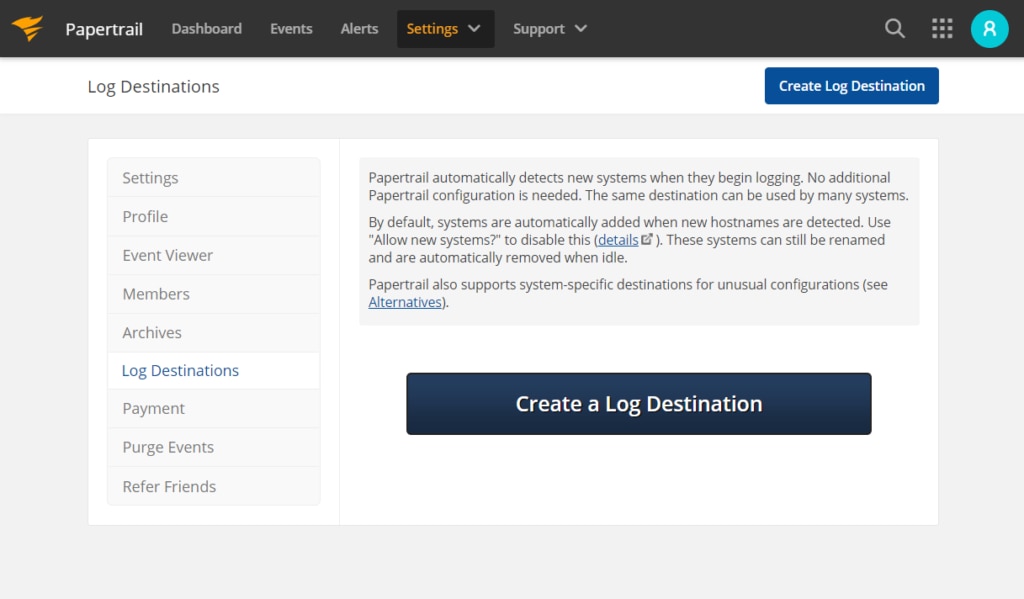
This will open the log destination configuration page.
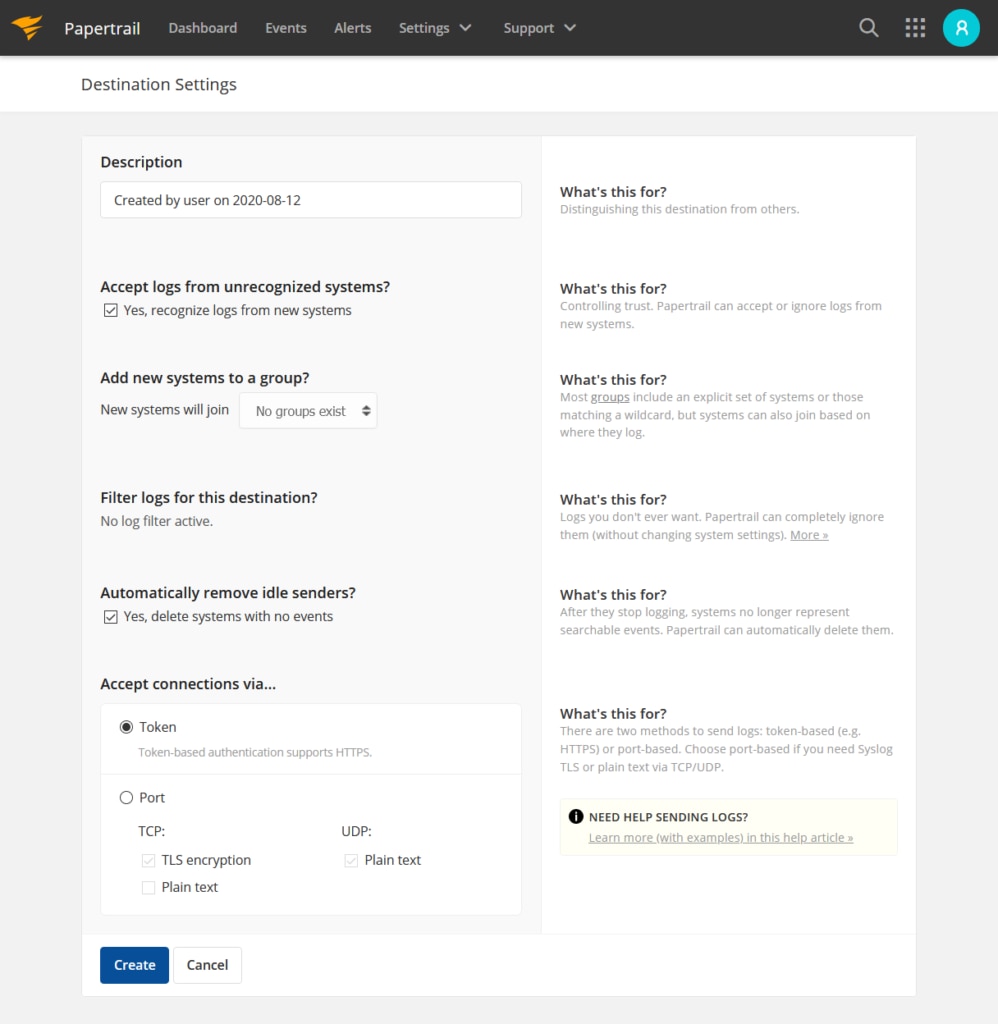
Enter a description and adjust destination settings as needed.
From the Accept connections via… pane, select one of the following options:
- Token – to send logs via HTTPS
- Port – to send logs via Syslog, and select the kind of messages you want to be received by this log destination. Log messages can be delivered using a TLS-encrypted Syslog over TCP, as well as over UDP. Papertrail also supports unencrypted TCP (Plain text), although this is not often used.
Click Create.
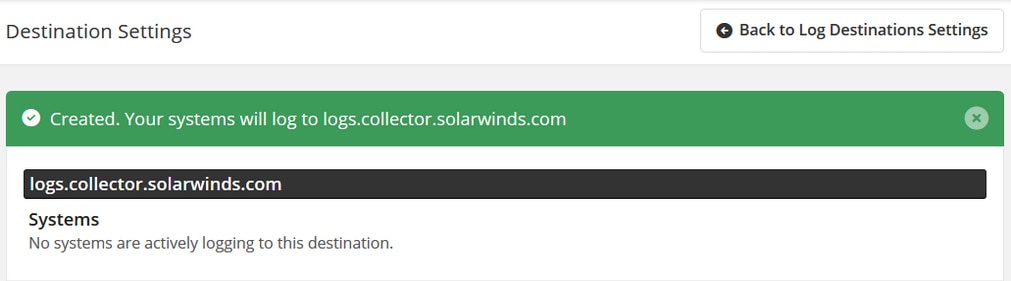
After the confirmation message appears along with the log destination address, click Back to Log Destinations Settings. The newly created log destination will be listed on the Log Destinations page. You can still modify the log destination’s Settings or add Log filters.
Port-based destination
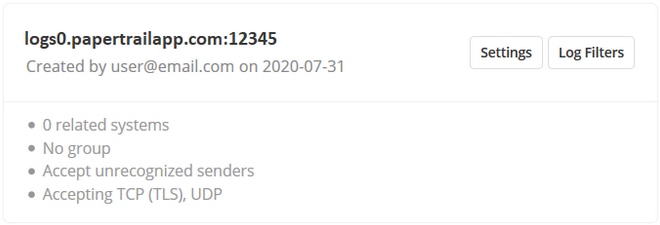
If Port was selected in the Accept connections via… pane during the log destination setup, the new destination will accept logs sent to a dedicated host/port using the Syslog protocol. It is in the format of logsN.papertrailapp.com:XXXXX where logsN.papertrailapp.com is the host and XXXXX is the port.
Sending logs
For a guided logging setup, you may navigate in the local setup page found inside Papertrail. More examples will be found in Configuration.
Token-based destination
If Token was selected in the Accept connections via… pane during the log destination setup, the new destination will accept logs sent via HTTPS. These destinations use a provided token for the authentication of POST requests when sending events and can accept single or newline delimited events formatted in plaintext or JSON. If your log’s format is not supported, contact us.
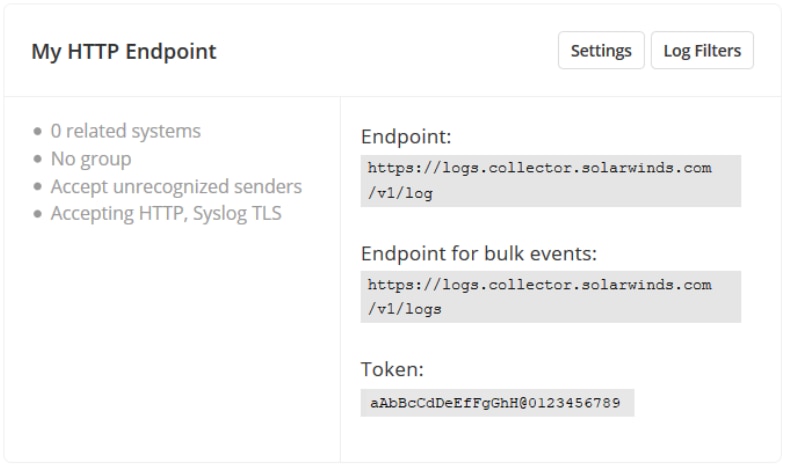
Sending logs
Both endpoints use HTTP “Basic” authentication. The token provided will serve as your password and the username is left blank. A successful POST request will return an HTTP status code of 200.
The following are some cURL examples to get you started.
Single and Multiline events
To send single and multiline events use the endpoint https://logs.collector.solarwinds.com/v1/log. Replace the TOKEN with the value found in your log destination details.
Plaintext
$ curl -vu :TOKEN -H "content-type:text/plain" -d 'Hello World' https://logs.collector.solarwinds.com/v1/logMultiline
$ curl -vu :TOKEN -H "content-type:text/plain" -d $'Hello\nWorld' https://logs.collector.solarwinds.com/v1/logJSON
$ curl -vu :TOKEN -H "Content-Type: application/json" -d '{"tests": ["testing HTTP 01", "testing HTTP 02"]}' https://logs.collector.solarwinds.com/v1/log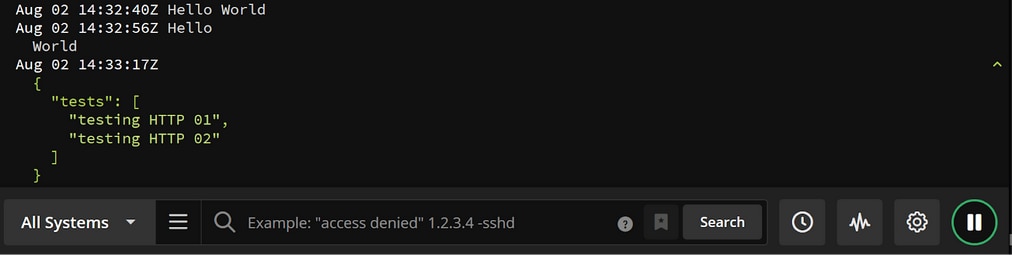
Bulk events
To send multiple events at once use the endpoint https://logs.collector.solarwinds.com/v1/logs. Replace the TOKEN with the value found in your log destination details.
Multiple events
$ curl -vu :TOKEN -H "content-type:text/plain" -d $'Hello\nWorld' https://logs.collector.solarwinds.com/v1/logs
The scripts are not supported under any SolarWinds support program or service. The scripts are provided AS IS without warranty of any kind. SolarWinds further disclaims all warranties including, without limitation, any implied warranties of merchantability or of fitness for a particular purpose. The risk arising out of the use or performance of the scripts and documentation stays with you. In no event shall SolarWinds or anyone else involved in the creation, production, or delivery of the scripts be liable for any damages whatsoever (including, without limitation, damages for loss of business profits, business interruption, loss of business information, or other pecuniary loss) arising out of the use of or inability to use the scripts or documentation.