
Administrator Guide
Collect Logs
Collect Logs: Apps & Services
Collect Logs: Hosting Services
Collect Logs: Integrations
Manage Logs
Send Logs for Analytics
SolarWinds Users & Orgs
Support and Security
What's New
How to import one or more archives into a locally-installed application called OpenRefine (formerly Google Refine) to manipulate and export logs.
Download and install OpenRefine here.
Download a log archive, which is in tab-separated value (TSV) format (more).
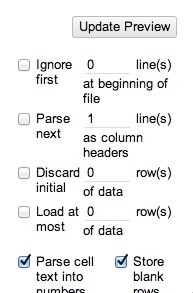
Start OpenRefine, which will load it in a Web browser. Upload the archive file and let OpenRefine auto-detect its settings. Un-check “Parse next 1 lines as column headers”:
In the column header dropdown menu, choose Facet -> Text facet. This will start as a simple count of occurrences of the values in that column (such as by program name or sending system). See faceting on OpenRefine wiki.
In the column header dropdown menu, choose Text filter. A sidebar menu supports text filtering. The sidebar supports filtering the message column with a string or regular expression.

Centralized log management to find and fix issues faster.

© 2026 SolarWinds Worldwide, LLC. All rights reserved.